

No time? Here’s the TL;DR: The article compares four habit tracking apps, Everyday, Habitica, Streaks and TickTick, based on how well they support the realities of individual users’ day-to-day life. Everyday comes out on top for its simplicity, beautiful interface and price-peformance ratio.
Trying to build a better way of life through healthier routines and consistent habits sounds easy, at least until everyday life gets in the way. There are a lot of habit tracker apps, and most of them look pretty similar until you’ve used one for a fortnight. Then the differences show up. One buries logging three taps deep. One guilt-trips you the second you miss a day. One’s beautiful and does nothing. The right one mostly gets out of your way and quietly keeps you coming back.
That last part is what actually shapes a way of life. Not the checkmarks - anyone can tap a checkmark! - but whether the app makes the next day easier or harder after you’ve slipped. Because you will slip. The routine wobbles, and the habit only survives if picking it up again feels like nothing.
So this guide isn’t a list of features. It’s four apps judged on whether they hold up in a normal, messy week: a minimalist streak-first tracker, a gamified one, an Apple-focused option and an all-in-one productivity platform. Different strengths, different kinds of person. Here’s how to work out which is yours.

What You’ll Find In This Guide For A Better Way of Life
- Everyday
- Habitica
- Streaks
- TickTick
Habit Tracking Apps You’ll Want to Try For A Better Way of Life
1. Everyday
 At a Glance
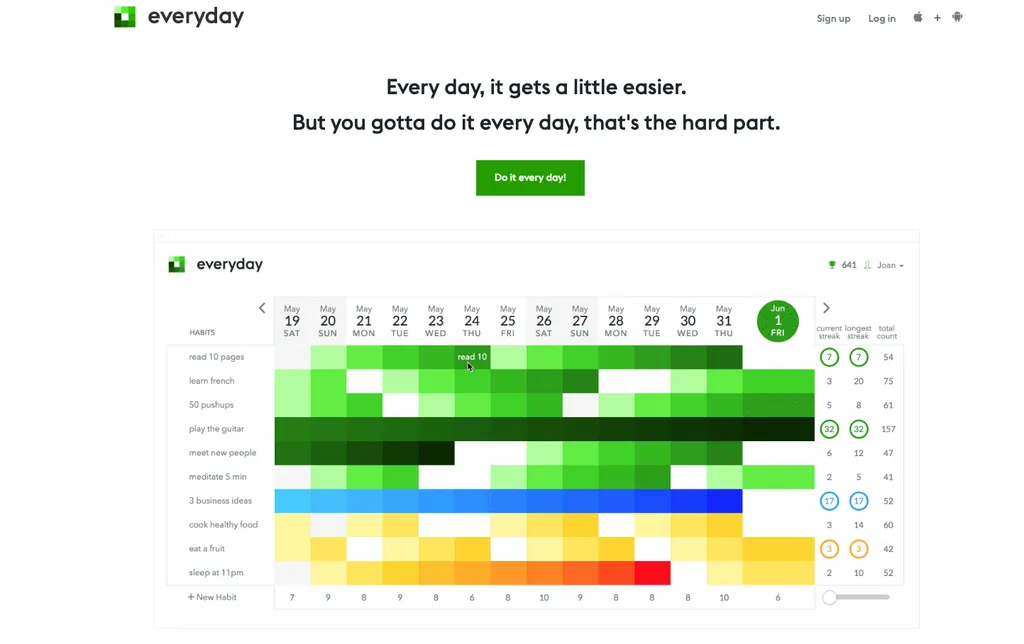
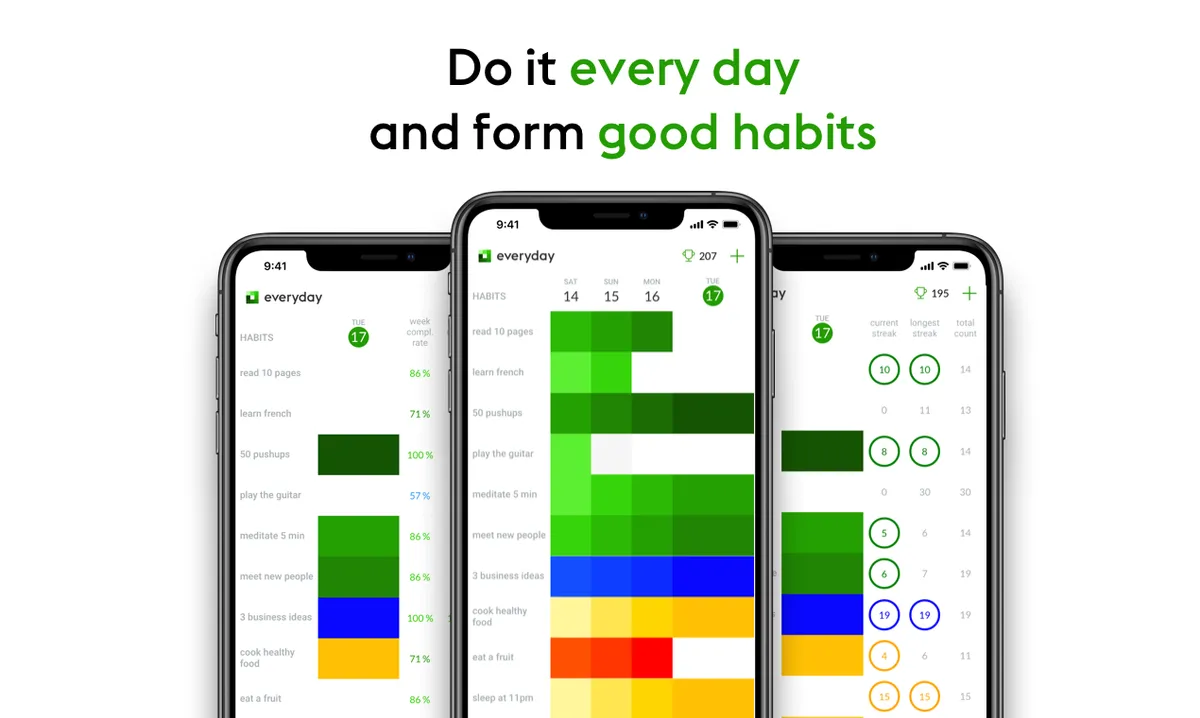
Everyday is a clean, easy habit tracker built on a simple idea that often proves true here: doing something regularly usually works better than going all‑in for a short burst. There are no dense dashboards to figure out, and no AI trying to move your calendar around. Instead, the app focuses on visual streaks and quick check‑ins, with habits tied to routines you already have, like mornings or workdays. It runs across devices and syncs on its own, then mostly stays out of your way once you’ve set things up. That’s very much intentional. For people who care about long‑term behavior change and want something calm instead of pushy, Everyday feels refreshingly human and surprisingly grounding.
Core Features
- Visual streak‑based habit tracking
- Simple habit board with at‑a‑glance progress (no digging around)
- Cross‑device sync (mobile + web across five platforms, including web, iPad, iPhone and Android devices)
- Gentle reminders that avoid guilt tripping
- Flexible skip system for real life days
- Weekly, monthly, and yearly progress views
- Minimalist, distraction‑free interface
Pros
- Simplicity: Logging a habit takes seconds, even on busy days. That low effort matters more than most people expect.
- Motivating streak visuals: Progress is easy to spot and quietly satisfying, without noise or pressure.
- Flexible rules: Missing a day doesn’t erase everything or make you want to give up, which fits how life actually works.
- Low mental load: There’s no clutter, and you’re not wading through features you’ll never touch (a genuine relief).
- Cross‑platform consistency: Your habits stay in view whether you’re on your phone or sitting at your computer.
Who It’s For
Everyday works well for users who want to build habits without feeling pressured. It’s especially welcoming for beginners! It also suits people coming back from burnout, or anyone who tried complicated productivity systems before that didn’t work for them. If any of that that sounds familiar, you’re definitely not alone.
What Makes Everyday Different
Most habit apps promise dramatic change. Everyday supports progress in a more realistic way. Its clever design pulls from behavioral psychology: small actions, clear feedback, and simple, beautiful visual cues that encourage rather than demand. App-related stress drops, and trust in yourself builds over time.
Founder Joan Boixadós found most habit trackers on the market too cluttered, trying to cover too many things and offering features that don’t add any real value. His approach with the Everyday habit tracker is to do one thing and do it right: you open the app, find the habit, mark it done, and move on. Simple!
Real‑World Use Case
A remote worker wants to feel less stressed and stay focused. They’re motivated to make immediate progress, which makes them initially think they need to track ten habits. Instead, they start with two: a five‑minute stretch and a short planning check‑in. The Everyday app’s bright, bold streaks make progress easy to see, and after a few weeks, both habits feel natural instead of forced.
Pricing: Free plan with generous features and lifetime access; paid options available
2. Habitica
 At a Glance
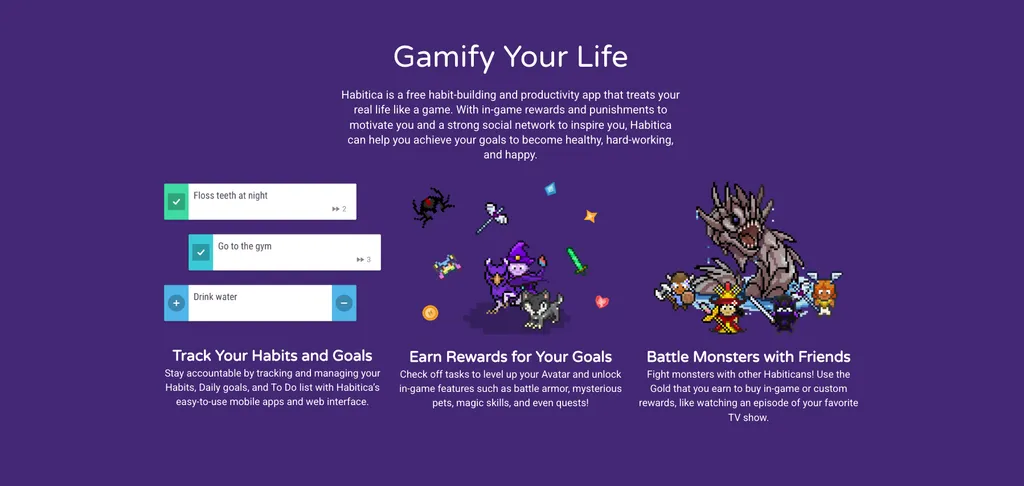
Habitica is one of the best-known self growth apps, with over 4 million ‘Habiticans’ to-date. Users earn rewards and incentives for completed habits, level up a character, create to-do lists, and have the option to join groups for social accountability. It’s not for everyone, but for the right user, the RPG-style suits people who get bored with ‘normal’ habit trackers.
Core Features
- Habit and daily tracking, plus to-do lists
- RPG-style rewards and character leveling
- Social features and accountability, so you’re less likely to slack off
- Support across multiple platforms
Pros
- Highly engaging: The game-like setup can make everyday tasks feel more rewarding, even small ones.
- Strong community: Group challenges add accountability, especially for people who usually do better with support.
- Motivating rewards: Progress can feel more immediate than in many standard apps, which may help if motivation fades quickly.
- Flexible categories: It works for self-improvement, but it also helps with daily task management.
Cons
- Busy interface: The design can feel overwhelming if a minimalist tool is more your style.
- Not for everyone: Some users may find the game style distracting, and for others it can feel a little childish, so a lot depends on personal taste.
- Extra complexity: It can take more time to set up and keep using than simpler apps.
Who It’s For
Habitica is for users who need a bit more than a streak to stay motivated. The game layer and social side helps make habit formation feel motivating and fun.
Pricing: Free tier available; optional subscription starting at $4.99/month or $47.99/year
Website: https://habitica.com
3. Streaks
 At a Glance
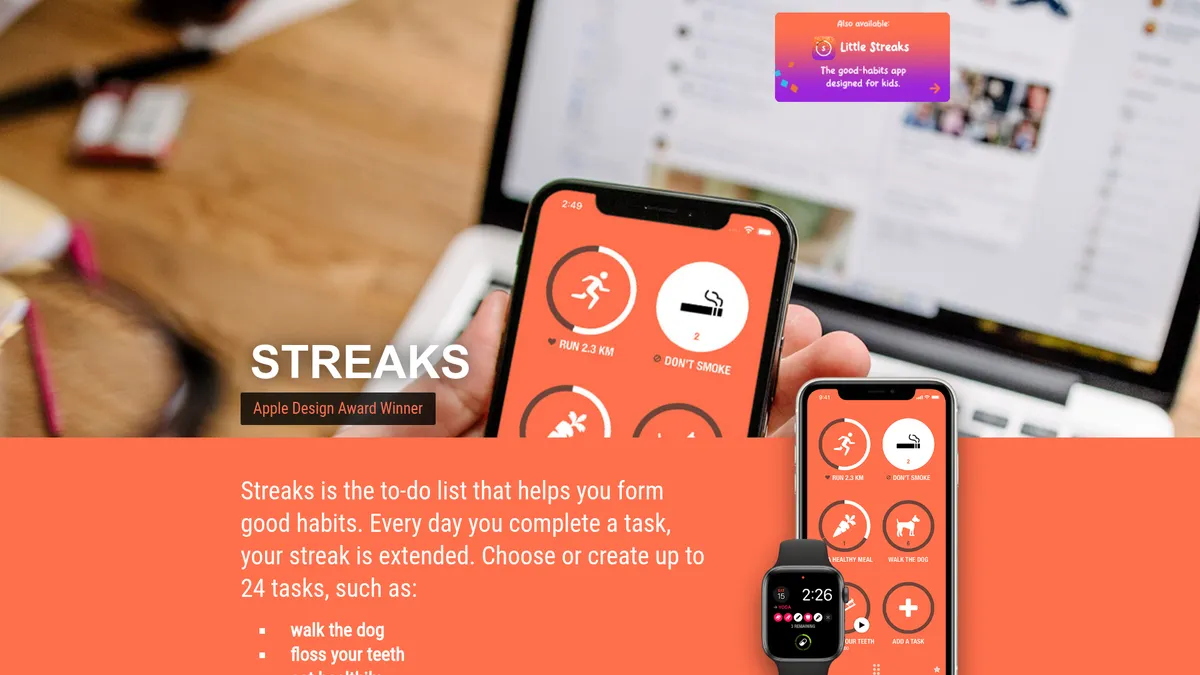
Streaks is probably the most polished, Apple-first option in this lineup, and it’s really built around one job: helping you stay consistent. It’s a minimalist habit app that can track up to 24 habits. For anyone who likes opening an app, marking something done, and moving on with the day, Streaks does that well.
Core Features
- Streak-based habit tracking
- Customizable task frequency
- Apple Health integration
- Support across Apple devices
- Minimalist interface
- Habit reminders
- Simple habit setup for recurring goals
- Progress visibility focused on consistency
- A streamlined user experience with no clutter
Pros
- Simple user experience: It’s easy to learn and usually takes very little time to use.
- Polished design: The app feels smooth, clear, and carefully made.
- Strong Apple fit: It’s a great choice if daily life already happens on an iPhone, Apple Watch, or other Apple devices.
- One-time payment: Many users can avoid an ongoing subscription, which is nice to have.
Cons
- Apple-centered: It’s not a strong fit for Android users.
- Less flexible for teams or social support: There’s less community, and the built-in coaching is more limited.
- Lighter feature depth: Users who want deeper analytics will probably find it somewhat limited.
Who It’s For
Streaks suits people who just want to tick something off and get on with their day. There’s no gamification or social features, which suits users who have found that kind of thing distracting rather than motivating in the past.
Pricing: $4.99 one-time purchase
Website: https://streaksapp.com/
4. TickTick
 At a Glance
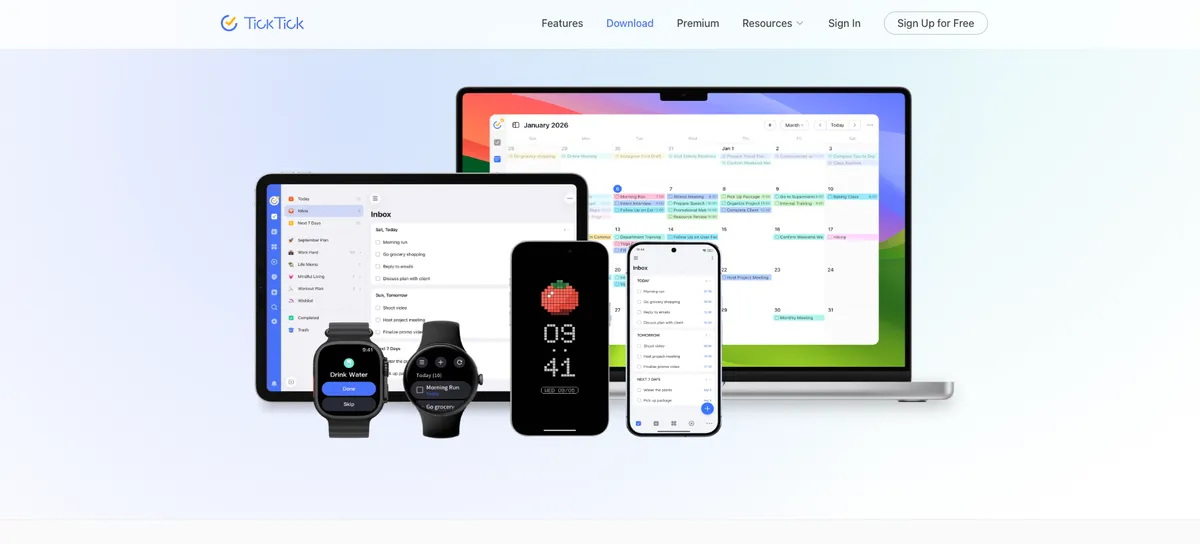
TickTick is more than a habit tracker. It’s a broader productivity platform that brings together habits, tasks, calendar planning, focus timers, and stats, which makes it a pretty big mix.
Core Features
- Built-in habit tracking.
- To-do lists and task management
- Calendar views plus a Pomodoro or focus timer
- Progress statistics
- Productivity planning across work and personal life
- Cross-functional routine management
Pros
- All-in-one setup: Handy if you want tasks, habits, and planning in one place, which makes everything feel really convenient.
- Good for structured users: Probably a great fit if you like running life from one dashboard with everything organized there.
- Focus features included: The timer can help with deep work and building routines, which can make staying on track easier.
- Versatile: It works for personal workflows and professional ones, so it’s useful in both situations.
Cons
- Broader than many users need: If someone only wants habit tracking, it can sometimes feel more complicated than necessary.
- Premium matters: Some of the most useful features are behind paid plans, and that definitely matters, especially for anyone on a budget.
- Can increase app overhead: You might end up spending extra time organizing things instead of just checking in, which can be a real downside.
Who It’s For
TickTick is best for productivity fans who want habit tracking along with planning, calendars, and daily task management, all in one app. It seems to work especially well for people who like systems and want one tool to manage several parts of their routine in one place.
Unique Value Proposition
TickTick’s real strength is how it brings everything together. Instead of using one app for tasks and other tools for focus sessions or habits, it gives users one central place to manage it all side by side, which is really handy. That can help a lot, especially when a routine depends on planning and execution staying closely connected and in sync.
Pricing
Research listed Pro at $9/month or $84/year, though it’s probably a good idea to verify current pricing on the official pricing page.
Website
How These Habit Tracking Apps Compare
The biggest difference between these apps comes down to philosophy. Some are built around rewards and motivation. Others are designed to fit into an ecosystem you already use. A few try to be a broader productivity hub, combining tasks, planning, and habit tracking in one place. And some, like Everyday, strip the daily action down so much that staying consistent feels more doable.
| Company | Key Features | Pros | Cons | Pricing |
|---|---|---|---|---|
| Everyday | Visual streaks, clean habit board, cross-device sync, reminders, flexible skips, weekly/monthly/yearly views | Simple, motivating, flexible, beginner-friendly, cross-platform | None | Free plan + paid options |
| Habitica | Habits, dailies, to-dos, gamification, quests, social accountability, web + mobile | Fun, community-driven, motivating, versatile | Busy interface, game-like style not for everyone, more setup | Free core app + premium options |
| Streaks | Streak-based tracking, minimalist design, fast check-ins, Apple-focused experience | Polished, simple, fast, great for Apple users | Apple-centric, limited depth, fewer broader features | Around $5.99 one-time |
| TickTick | Habit tracking, to-dos, calendar, Pomodoro timer, stats, planning tools | All-in-one, structured, versatile, strong productivity fit | Can feel too broad, premium-gated features, more complexity | $9/month or $84/year for Pro in research |
If the goal is a better way of life, the best app is the one that makes it easier to repeat small actions long enough for them to feel normal. With less setup and less resistance, it’s easier to follow through and easier to come back the next day.
Make Your Routine Easier To Keep For A Better Way of Life
If you’ve ever downloaded a habit app, gone all in for four days, and then totally forgotten it was there, you’re not the problem. Usually, the system was just asking too much. There were too many habits to manage, too many features competing for your attention, and way too much pressure to do everything perfectly.
That’s where Everyday really works well. It keeps the focus on the part that actually helps change behavior: showing up again tomorrow. And everyday after that! The design stays simple, the streaks feel encouraging, and the structure makes space for real life instead of pretending every day will go exactly as planned, because it probably won’t.
If you’re looking for one of the best apps for habit tracking and want something that supports a genuinely better way of life, start with the app that keeps things clear and easy to use. Visit https://everyday.app/ today and have a go at building one habit. Not ten. Just one. You’ve got this!
FAQs
Are free habit tracker apps good enough?
For a lot of people, yes. If all you need is somewhere to log the habit and a reminder to keep you honest, the free versions tend to cover it. Everyday is a decent place to start – you can track up to three habits free, forever!
How long does it take to see results from habit tracking?
You’ll probably feel a bit of momentum inside the first fortnight, but that isn’t the same as the habit running on autopilot – that part takes longer. The research usually quoted here puts habit formation between 59 to 66 days, so it’s worth settling in for the long haul.
Which app is best for beginners who want a better way of life?
If you’re just starting out, you’ll want something straightforward that won’t punish you for slipping up. Everyday keeps things visual and easy, so you can begin with a habit or two without feeling swamped.
What kind of users benefit most from habit tracking apps?
Anyone trying to make a positive change stick tends to get something out of it, whether that’s around productivity, wellbeing or just building a steadier routine. It suits students and busy professionals particularly well, along with anyone who’d rather not leave their good intentions to memory and willpower.