

Need an easy summary? Here’s the TL;DR: This article compares the habit tracker apps Everyday and Productive.
Everyday leads with its simple design, visual streak tracking, flexible options for missed days, and cross-device syncing. Productive offers heavier structure and planning focused on productivity, which works well for certain users.
When life gets hectic, Everyday is the easiest and most reliable option to start with.
If you’ve found yourself here to compare Everyday vs Productive, you’re probably not just looking for another app to install. You want something that actually helps you stick with your habits.
In this comparison guide, we say down with the two contenders with a single question in mind: which app keeps habit building clear enough to stay useful when life gets chaotic? The last thing you want is an app that just piles on more stress! It needs to be quick to check and quick to update, and it has to keep you motivated rather than turning into a burden. There’s just no point otherwise!
In our humble opinion, the best place to head is Everyday. It keeps you focused in on showing up each day, it tracks progress clearly, it only pushes gentle reminders when absolutely necessary, and it supports you in building beautiful, strong streaks without making personal growth feel like extra work. Simple and useful!
1. Everyday - your simple, beautiful habit tracker
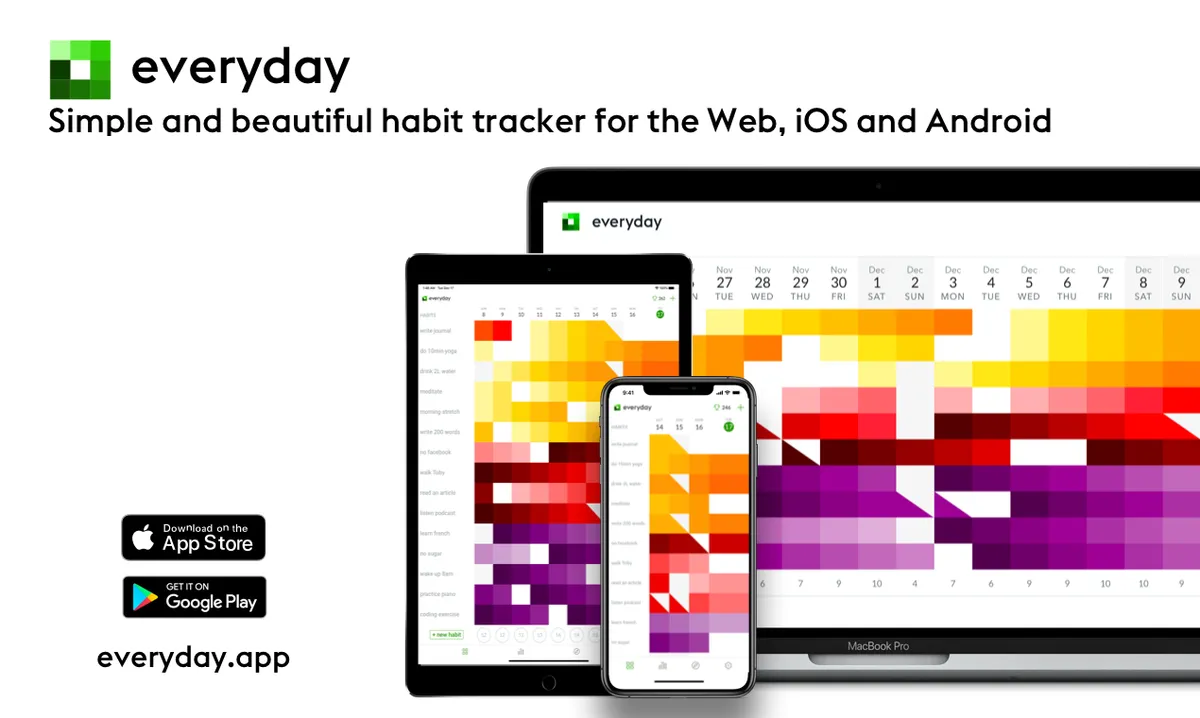 Everyday At a Glance
Everyday is a simple, beautiful habit tracker focused on streaks, clear visibility, and quick daily check-ins. There are no dense dashboards to figure out, and no AI trying to move your calendar around. Instead, the app focuses on bright, visual streaks and quick check‑ins, with habits tied to routines you already have. It runs across devices and syncs on its own, then mostly stays out of your way once you’ve set things up. That’s very much intentional! For people who care about long‑term behavior change and want something calm instead of pushy, Everyday feels refreshingly human and surprisingly grounding.
Core Features
- A visual habit board makes it easy to check progress at a glance, which is nice, and quickly see what’s already done.
- Streak tracking uses the “don’t break the chain” idea, so it stays simple and is probably pretty motivating day to day.
- Cross-device sync keeps things up to date across web and mobile
- Simple reminders come by email or mobile push notifications, which can be toggled on and off as you wish
- A flexible skip option helps with travel, illness, and irregular routines, because real life really does get messy sometimes!
- Data visualization shows habit patterns over time
- You can sort, color-code, group, and even track habits you’re trying to break
Pros
- Very easy to use: Logging a habit takes only a few seconds, which makes it much easier to keep up with, even on busy days when routines often fall off.
- Strong visual motivation: The board makes progress easy to see, and watching chains grow over days or weeks can be a small but satisfying boost.
- Flexible for real life: With skip days, no-weekend habits, and break-habit settings, the app fits real routines much better. It supports consistency without expecting perfection.
- Cross-platform access: Habits stay easy to check throughout the day since you can view them on your phone or desktop, whether you’re at work or at home.
- Low mental load: It stays focused on habit tracking instead of adding extra features, and that simplicity is usually a real advantage.
Who Everyday For?
This app is a great fit for beginners, busy professionals, students, and anyone tired of complicated productivity systems. It works especially well if you want to start with just a few habits. Consistency usually comes first here, so simple feedback can make it easier to keep going over time without overthinking things.
Why Should I Use It?
What makes Everyday stand out is how intentionally simple it feels. A lot of habit apps try to be planners, coaches, wellness hubs, and task managers all at once. Everyday does less, but it does the main job really well.
Its visual board makes habits easy to scan day by day at a glance. Reminders help with the “don’t miss twice” mindset. And the design stays close to the feel of a paper tracker, while still giving you sync, stats, and some flexibility. That usually makes it feel more doable and probably easier to stick with over time.
Pricing
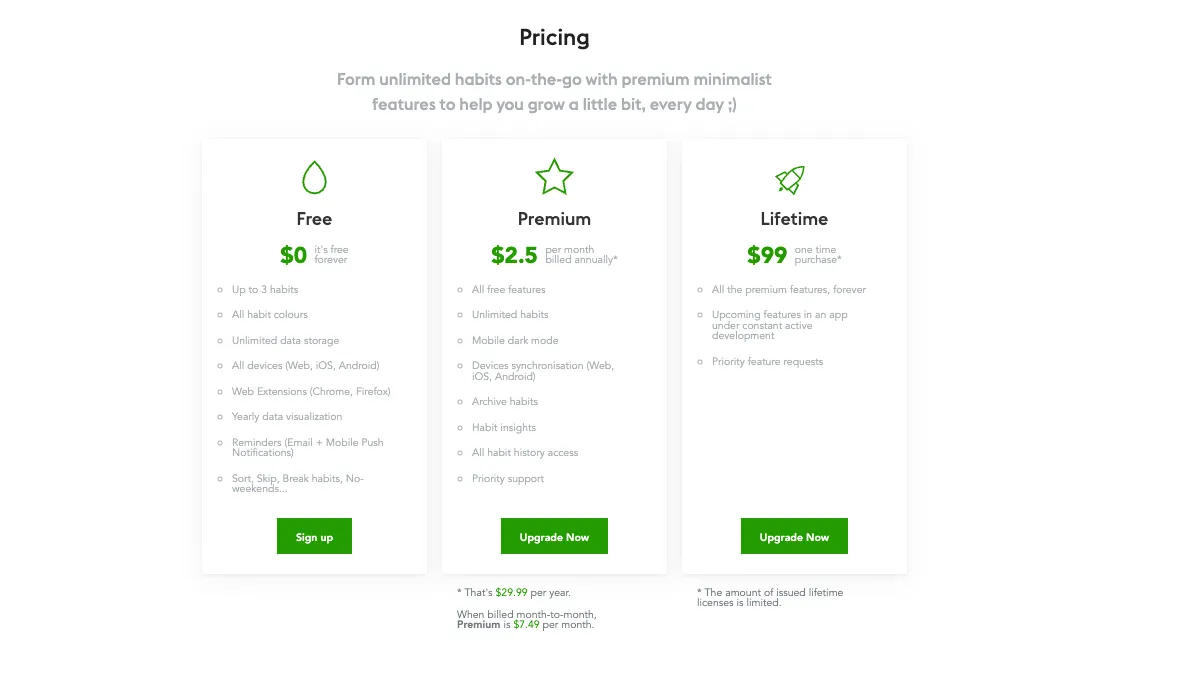
There’s a free plan for up to 3 habits – yours to track free forever. Premium starts at $2.50 a month when billed yearly, or $29.99 per year. Monthly pricing is $7.49, and there’s a lifetime option for $99.
Website
2. Productive - your habit building manager
Productive At a Glance
Productive leans more toward personal productivity and structured routine planning, with reminders, streaks, and progress tracking in a polished, mobile-first app. It’s also a solid mainstream option for people who want more guided habit scheduling. But here, some users may find the free version limiting over time if they want deeper features without paying for a subscription.
Core Features
- Easily track daily habits
- Scheduled reminders
- Time-based reminders and location-based alerts
- Streaks and progress updates
- Goal and routine planning
- Mobile-friendly
Pros
- Productivity-focused setup: A solid pick for someone who wants habits tied closely to personal organization, like tasks and daily planning, which often makes things easier. It feels simple and useful.
- Polished app design: The mobile app feels modern, and moving around is easy, so there’s almost no learning curve. It stays straightforward.
- Helpful reminder tools: Time and location reminders can support behavior cues, so habits are often easier to remember in daily life.
- Broad appeal: Works well for anyone who wants a mainstream habit app with more guidance and extra structure. Overall, it feels friendly and easy to use.
Cons
- Paywalled features: Some useful tools stay locked unless you upgrade, which can get frustrating pretty fast.
- Less flexible free tier: Limits can appear pretty early, and that’s not great.
- Can feel more structured than needed: For some people, a productivity-focused habit-building approach just feels like too much.
Who Is Productive For?
Productive is a good fit for people who want habit tracking closely tied to performance, routine planning, and reminders. This might work particularly well for professionals and goal-focused users who like clear structure.
Why Should I Use It?
Productive’s main strength is its clear focus on… you guessed it – productivity. It treats habits as self-improvement goals, which feels pretty practical, and puts them inside a bigger system for planning the day and keeping life organized. That’s often especially helpful for people who feel more motivated by structure and planning.
Pricing
Free with some limits. Premium tier at $4.17/month (billed annually at $49.99/year), $29.99/year during promos.
Website
Which App Should You Pick?
If you’ve tried building better routines before, you already know the hard part usually isn’t choosing what to do. It’s remembering, repeating, and getting back into it when life gets busy, which happens to almost everyone. That’s where a solid habit tracker can really help.
A good tool should make habits easy to see and simple to log, while also helping you keep going after a missed day. In this comparison, that’s why Everyday stands out.
Ultimately, choosing among the best habit tracker depends on your goals and lifestyle. Everyday is our pick for sustainable habit formation. You get flexible pricing with an excellent free tier, a beautiful interface, seamless cross-platform synchronization, and a system that simply works.
If juggling planners and AI tools with nonstop reminders sounds familiar, this is the calmer option by far. Curious? Download the app at https://everyday.app/ and try up to three habits today – completely free!
FAQs
What should I look for when choosing a habit tracking app?
We think ease of use matters most. Beyond that, check the reminder options, streak tracking, flexibility and which devices it runs on. The app you actually stick with tends to win, and that is rarely the one with the longest feature list.
Is Everyday or Productive better for beginners?
If you are new to this, Everyday is the gentler starting point. The interface is stripped back, very sleek and beautiful, and the habit board gives you a clear visual read on your day. Productive works well too, though it leans harder into structured, business-like productivity tools.
How do I know if a habit app is actually working?
The repetition will start to feel automatic. Over the course of a few weeks – around 59 to 66 days to be exact (ScienceDaily) – you should be able to spot your own patterns and bounce back quicker when you miss a day of performing your habits. If nothing shifts after a couple of months or so, the app probably is not the right fit for you.
Are free habit tracking apps good enough?
For most people, yes! A free plan is usually plenty for testing out a handful of habits. The case for upgrading comes later, once you want unlimited habits or the deeper insights and customisation that paid tiers add. You can track up to three habits completely free, forever, on the Everyday app.
What type of user benefits most from Everyday?
Everyday suits anyone who wants a simple daily check-in rather than a project-management setup. Students and busy professionals get on with it well, as do people tracking wellness habits. You just have to do it everyday!